|
Tweak and optimize Windows Vista |
|
|
Home Order Download FAQ Screenshots Support Db of tweaks Lates version 1.1.0
|
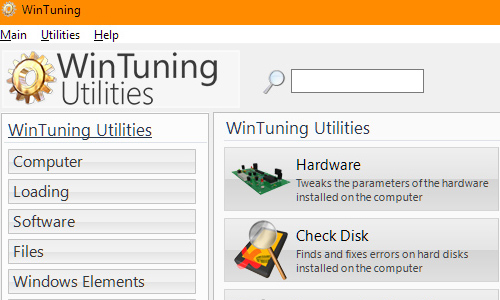
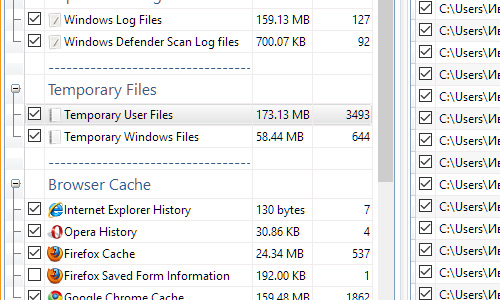
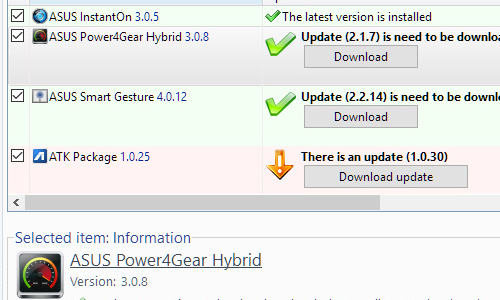
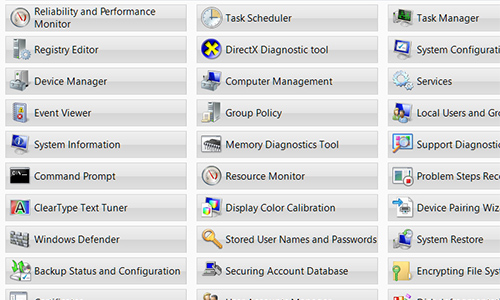
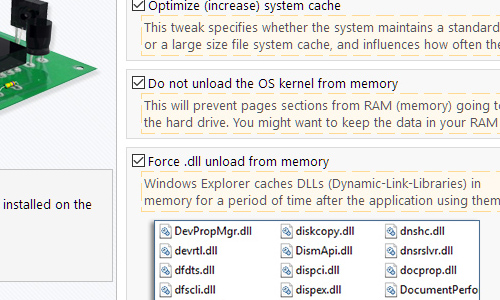
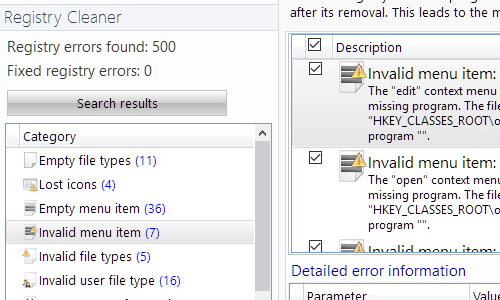
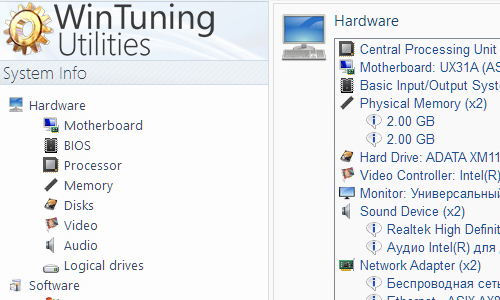
The program allows you to configure the boot / shutdown process, hardware parameters, speed up the Internet connection, change the settings of Windows Vista elements: Desktop, Context menus, Explorer, Taskbar, Start Menu and windows. The program offers tools to quickly rename files by mask, disk scanning, and automatic shutdown after a specified period of time, edit boot screen, remove unnecessary programs and junk files, check for updates for installed programs. Includes Clipboard and memory monitoring, allows get access to the information about your operating system, and to numerous built-in utilities of Windows Vista Each tweak has textual tips, and some of them have the image-tips also. It allows you to see the tweak in action. The program search you hard drive for unnecessary files (cache of browsers, logs, shortcuts of recent documents, temporary files, etc.) makes it possible to free up space on your hard drive. In the utility "Startup Manager" you can safely (it is possible to change it back) disable unnecessary programs that can slow the Windows Vista loading process down. The program contains the database of Windows Vista utilities, with detailed descriptions and the ability to run from the single window (80 utilities is in the database) WinTuning Vister allows you to optimize your system, your time and your life. Why WinTuning Vister? Windows Vista Status Monitor scans for errors of your Windows Vista operating system;
A lot of image tips for tweaks. It will help you to understand what will happen in Windows Vista after the tweak is applied;
Tweak your system to improve windows startup and shutdown speed; tweak your hardware to increase system speed and performance;
Find and clean junk files to increase Hard Disk space;
Optimize your Internet connection speed;
Tune up Windows Vista boot menu;
Customize Windows Vista Logon Screen;
Show the collection of Windows utilities;
Get detailed system and all hardware information on your system;
Edit context menus of mouse Right-Clicking;
All operations performed on the operating system are completely safe, because all changes can be undone at any time.
Where can I download WinTuning Vister? You can download WinTuning Vister from the download page. News 07.10.10 - WinTuning Vister 1.1.0 has been released. News archive Version history WinTuning Vister 1.1.0 [October 07, 2010] [+] Added new utilities: • Disk Check; • Startup Manager; • Control Panel Objects; • Uninstall Manager; [*] Improved utilities: • System CleanUp; • Auto Shutdown; • Boot Editor; • Mass Renamer; • Context Menu Editor; • System Info; • Memory Info; • Clipboard Monitor; [*] Fixed some errors. WinTuning Vister 1.0.9.1 [April 21, 2009] [*] Fixed "Range check error" which is occurred on systems with the "/" separator in the date format. Thanks to Bernard St-Pierre for reporting us the error. WinTuning Vister 1.0.9 [March 16, 2009] [+] Added "Boot Editor". It allows you to change displayed OS name on the boot, default OS and set timeout (default value is 30 secs); [+] "System" section: added function that allows you to set your CPU L2 cache size to optimize I/O operations; [*] Fixed fatal error "Invalid data type for 'WaitToKillServiceTimeOut'" - thanks to WinTuning Vister user Vitaliy; [*] Fixed some small bugs. WinTuning Vister 1.0.8 [March 07, 2009] [+] Added context menus for all functions of the program. It contains next three items: "Go to decription of the function on the website" - new database on the website where you can post comments about program functions; "Please give your rating for this function" - now user can choose which function are useful and which are not; and "The function does not work (inform about an error)" - you can quick and easy inform us about an invalid function. WinTuning Vister 1.0.6 [October 03, 2008] [+] Added new "Explorer" ("Settings" tab) section with the 13 new tweaks, including changing icon cache and choosing Your BMP-image for the Explorer toolbar; [+] Added new "Clipboard monitor" ("Utilities" tab) section; [*] Fixed lang codepage of some program elements; [*] Fixed twinkling of the image-tips; [*] Other fixes. WinTuning Vister 1.0.5 [September 06, 2008] [+] Added new "Context Menu" ("Settings" tab) section (because of desire of the WinTuning Vister user). It will help you to customize the context menus of Windows Vista explorer; [*] Some fixes. WinTuning Vister 1.0.4 [June 02, 2008] [+] Added new "Network" section which will help you to customize your Internet connections; [*] Improved the program interface (font size of tooltips and size of the tooltips area are increased, font face of the captions of sections is changed); [*] Different small fixes and improvements. WinTuning Vister 1.0.3 [May 01, 2008] [+] Added Russian imagetips for checkboxes and for other elements of the program; [+] Added Russian help system; [+] Added System Restore utility: 1. Creating/editing files of WinTuning Vister settings; 2. Creating image file of the Registry; 3. Creating System Restore Point of Windows Vista; [*] Improvement in the interface (picts on the buttons, the main program icon); [*] Different fixes. WinTuning Vister 1.0.2 [October 11, 2007] [+] Added some new settings to the "Desktop" section; [+] Added section "Mass Renamer", a feature that allows you to rename files by a mask-count; [*] Repaired error when files were moving to no exists folder (section "Disk Cleaner"); [*] All file operations (deleting, moving, renaming) realize with external Windows Vista functions; [*] Files already deleted to the Recycle Bin had been considered while searching in "Disk Cleaner" section. Fixed; [*] The same files added while searching in "Disk Cleaner" section; [*] Added context menu into "Wallpaper changer" section; [*] Dynamic array was created. It cancels restrictions of a quantity of deleted files in "Disk Cleaner" section; [*] TimeOut interval value of WinTuning Updates was increased; [*] Now all applications hunging up a computer killed by WinTuning on Auto Shutdown; [*] "Auto Shutdown": removed "Halt" feature; [*] Many different fixes and improvements both in interface and programming code. WinTuning Vister 1.0.1 [September 13, 2007] [+] Extended "System Info" section; [*] Different small fixes. WinTuning Vister 1.0.0 [September 06, 2007] [+] Added "Disk Cleaner" utility; [+] Added English support; [+] Added picture-tips for functions; [*] Removed some unnecessary functions; [*] Changed type of choosing of interval in "Wallpaper Changer" section; [*] Other fixes. WinTuning Vister 0.9.1 alpha [August 21, 2007] [*] Fixed "Password protection"; [*] Optimized detection of changing of settings in program; [+] Now Windows Vista updates while settings in program are saving; [+] Added new extensions JPG and JPEG in "Wallpaper Changer"; [*] Some improvements in interface; [*] Other fixes. WinTuning Vister 0.9.0 alpha (preview) [August 18, 2007] • First official preview-version (alpha) of WinTuning Vister. Note [+] - fixed; [*] - added. |
|